 Brim
BrimThe Brim guide
You can log your first meal within a minute of opening Brim. This guide gets you through that minute, then shows you the rest, from symptom tracking to a report you can hand your doctor.
Your first five minutes
- Confirm you're 18 or over. Brim never asks for your date of birth, only this one tick.
- Add an AI key. The setup guide walks you through a free Groq key: tap Set up with Groq, then Open Groq console, create a key, come back and tap Paste from clipboard and Check and save key. You can also Choose another provider, or Set up later.
- Allow sharing. A key on its own does nothing. Brim shows you exactly what it will send, and only switches AI on after you tick the consent box and tap Allow sharing.
- Tell Brim about you. In Profile, add your weight and height, choose a protein target, and under Medication pick On a GLP-1 medicine or None, just tracking food.
- Photograph something. Tap the orange camera in the middle of the bottom bar and point it at whatever you're about to eat.
Not on a GLP-1? Choose "None, just tracking food" and Brim works as a calm, protein-first calorie counter. Nothing else changes.
Logging a meal
The orange camera opens Capture. You can use any mix of these, and Brim combines them:
- Photo. Tap the shutter, or pick an earlier picture with Choose from gallery.
- Voice. Tap Describe and say what's on the plate, for example "two eggs scrambled with butter, one slice of sourdough". Tap Stop when you're done.
- Text. Type into the box: "half a tuna sandwich and an apple" is plenty.
- Barcode. Tap Scan a barcode on anything packaged. Brim looks it up on Open Food Facts.
No photo? Tap Estimate without a photo. Your words count for more than the picture anyway, especially for portions and hidden things like oil, sauce and milk.
Checking the estimate
After a few seconds you'll see the plate broken into items, each with its own portion. Calories appear as a range ("estimate · ±15%") because nobody can weigh food from a photo, and Brim would rather be honest than precise.
- Wrong portion? Drag that item's slider, type the grams, or tap ¼, ½, ¾ or All.
- Wrong food? Tap Not right? Tell me, type the correction ("the rice was brown, and there was no sauce"), then Re-estimate.
- Eaten earlier? Tap Change next to the time.
- Happy with it? Save meal.
Catching up on the past few days? Choose several photos from your gallery at once. Brim reads the date each one was taken and steps through them, so each meal lands on the right day.
Shortcuts you'll come to love
- Repeat a meal. Same breakfast every day? Quick log → Repeat a meal, search, tap. Done. Full
- Combine. Logged a starter and a main separately? Open either in the Diary and tap Combine to merge them into one meal.
- Pictures for text-only meals. With an OpenAI, xAI or Gemini key, Brim can paint a picture for meals you only described, so your diary stays visual. Switch it on in Settings → AI setup.
Today
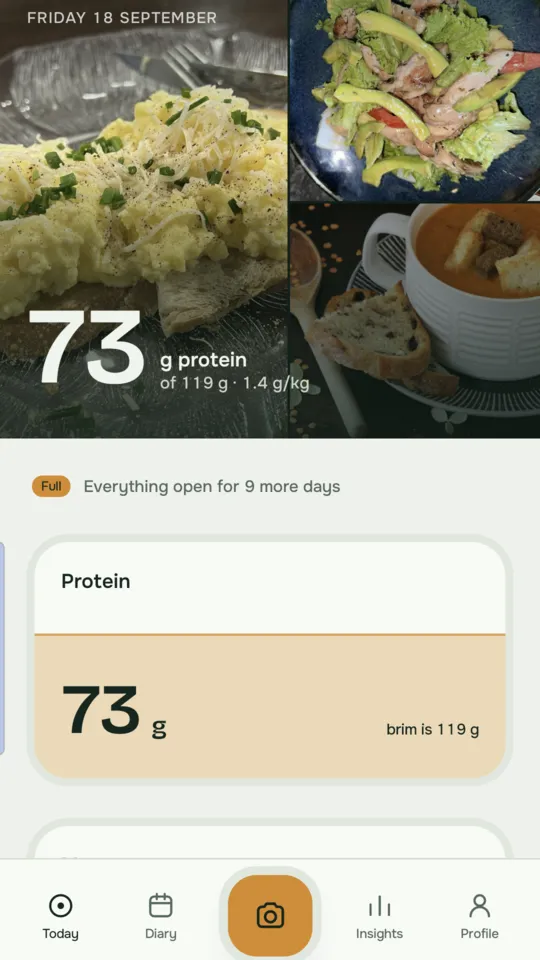
Today opens with your plates and one big number: protein so far. As you eat, the protein tile fills like a tide towards your brim, the target set from your body weight (1.2, 1.4 or 1.6 g per kg; you choose in Profile).
Below it, Macros shows how far you are from your carbs, fat and fibre targets, and Energy balance compares what you've eaten with your maintenance calories. The Body tile shows weight, sleep, steps and heart rate if you've connected Health Connect.
If you're short on protein late in the day, Brim offers three ways to close it. Tap the line and your AI suggests small, realistic options using what you've already eaten, your medicine timing and the foods you've said to avoid. Feeling sick today? The suggestions get gentler. Type what's actually in your fridge and tap Suggest for ideas that fit. Full
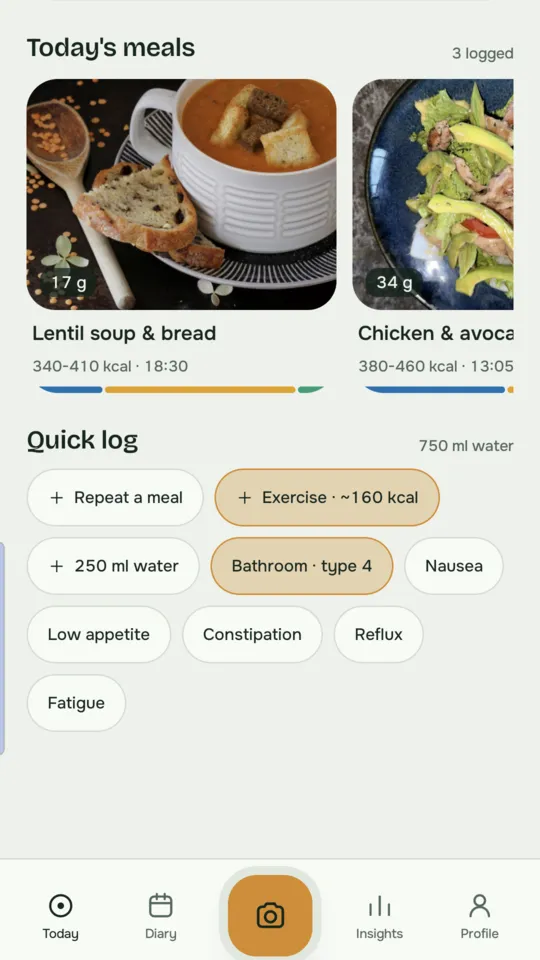
Everything else lives in Quick log at the bottom: water, exercise, bathroom and symptoms, one tap each.
Diary
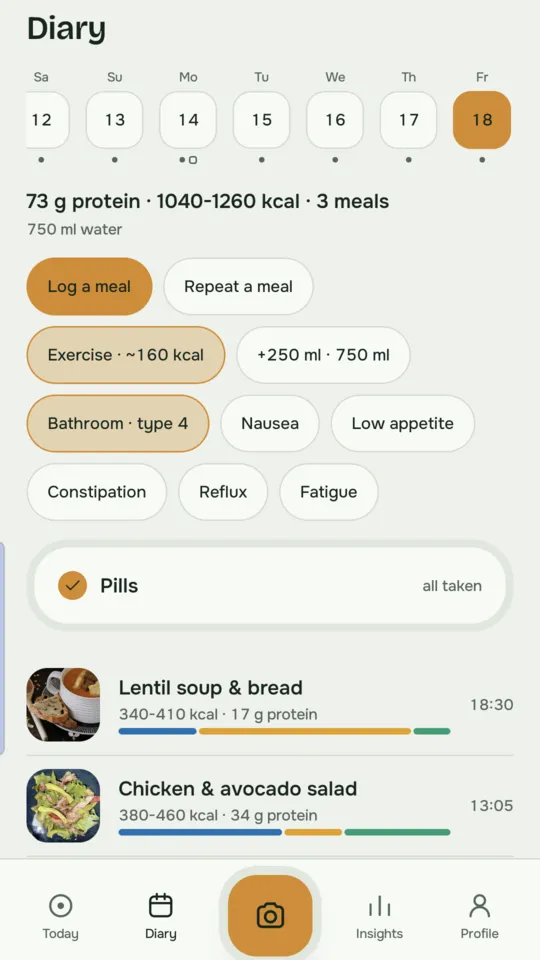
Swipe the day strip to go back in time. Days with meals and injection days are marked, so patterns jump out. Calendar jumps to a date and Search finds any meal or note.
Tap a meal to open it. From there you can Edit · re-estimate, Make a picture, Combine or Delete. Deleting is immediate, so take a second before tapping.
At the bottom, The day in full lays out macros against targets, water and key micronutrients (iron, calcium, B12, vitamin D, potassium). For past days it shows what would have closed the gaps, which is often more useful than any chart.
Free accounts can open the last 7 days; Full keeps your whole history.
Insights
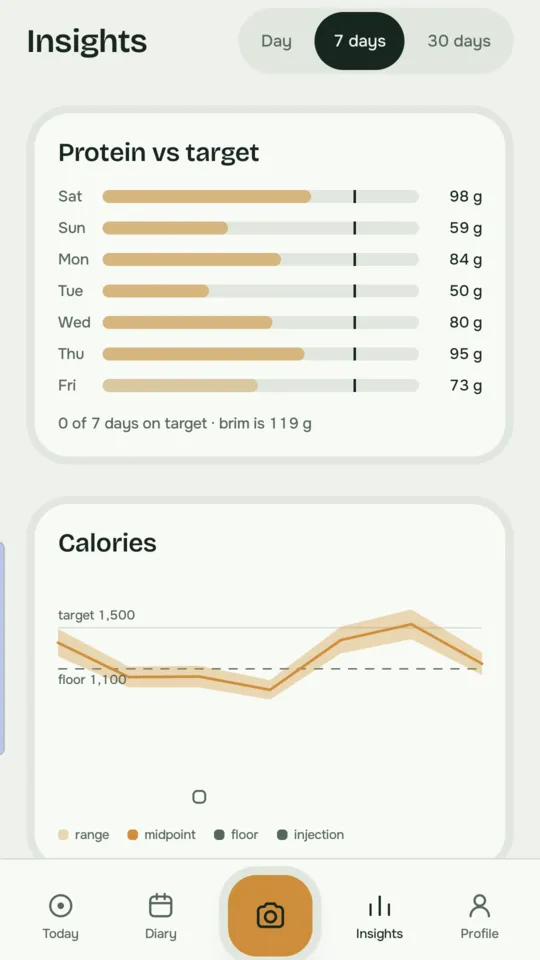
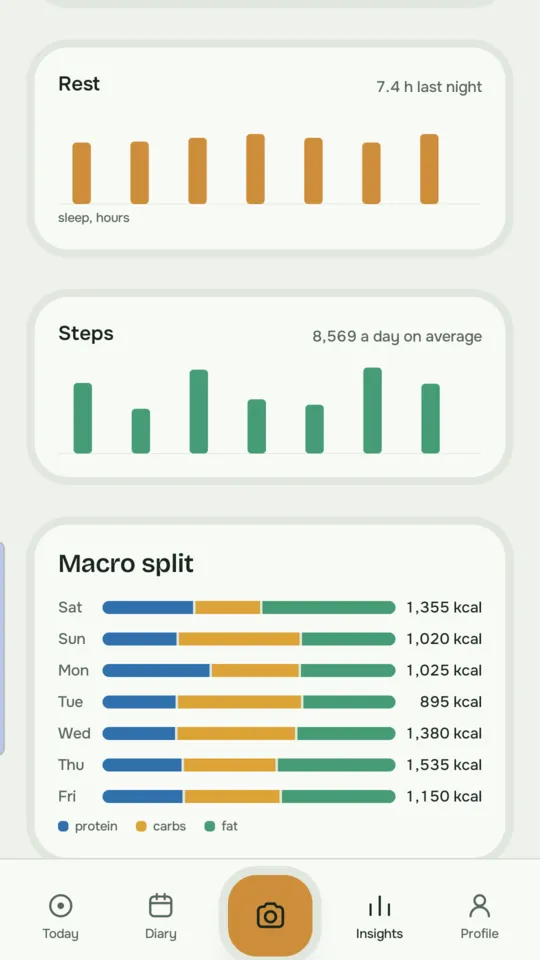
Insights is where a week of logging starts paying you back. Switch between Day, 7 days and 30 days to see protein against your target, calories with your injection days marked, energy balance, weight and body composition, heart rate, HRV, blood oxygen, sleep, steps, your macro split and micronutrients.
It fills in after your first few plates. The longer views are part of Full
Medicines and symptoms
Injections. In Profile → Medication, add your medicine, dose, start date and usual Injection day. Tap Log today's injection when you take it. Injection days appear on Today, in the Diary and on your calorie charts, so you can see how your appetite moves through the week.
Pills, vitamins and supplements. Under Daily pills, add each one. For twice-daily doses, use Add again (second dose). They appear as a checklist on Today: tick them off as you go and the tile shows "all taken" when you're done.
Symptoms. Tap Constipation, Nausea, Vomiting, Low appetite, Reflux or Fatigue in Quick log. They're lined up against your food, so you can spot what sets things off.
Bathroom. Tap Bathroom to log a visit on the Bristol scale (types 1 to 7), with size and optional notes. It stays on your phone, and it's the kind of detail a GP finds genuinely useful.
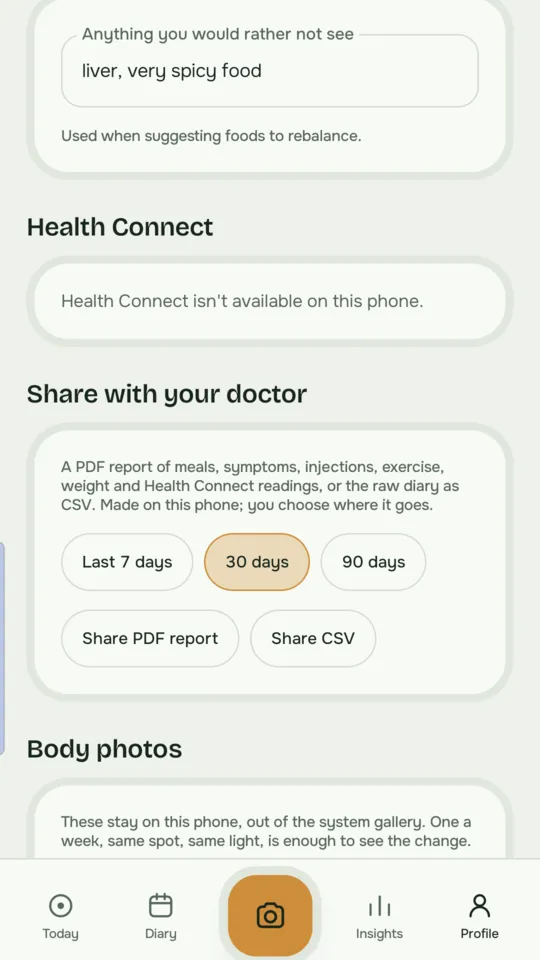
Conditions and foods to avoid. Add any conditions (for example type 2 diabetes or high blood pressure) and foods you don't eat in Profile. Brim's suggestions take both into account.
Water
Tap 250 ml water in Quick log each time you finish a glass. GLP-1 medicines can dull thirst, so on Android Brim can remind you: Settings → Drink reminders. The first nudge arrives when your morning alarm goes off (or at 08:00 if you don't set one), then every two hours. Logging a glass restarts the two hours, and reminders stop once you hit your target or after 16 hours. Tap Drank 250 ml on the notification to log it without opening Brim.
Exercise and energy
Tap Exercise in Quick log and type or say what you did: "40 minutes brisk walk, 50 sit-ups". Tap Estimate, check it, then Log all. Free accounts use a standard activity table; with Full, your AI estimates from your own description and body.
To make Energy balance meaningful, set your maintenance calories in Profile → Maintenance calories. Calculate works it out from your weight, height, age and activity, or choose Enter my own if your watch or clinician has given you a number.
If your watch writes workouts to Health Connect, they come in automatically.
Meal plans
The Plans tab is for the days you'd rather not think. Pick a style (Balanced, Vegetarian, Vegan, Omni low GI or Carnivore), slide your calories for the day, and you get a protein-led day of meals you can log with Log this. There's a Rough day option for when appetite is low, a weekly shopping list, and the simple rules that make it work. Plans are free for everyone.
Health Connect AndroidFull
Health Connect lets Brim see what your scales, watch and other apps already know. Go to Settings → Health Connect → Connect and choose what to share.
Brim reads weight, body fat, lean mass, bone mass, body water, heart rate, resting heart rate, HRV, blood oxygen, blood pressure, respiratory rate, body temperature, VO₂ max, sleep, steps, workouts and active calories.
Brim writes your meals' calories and macros, so other apps can see what you ate.
It syncs the last 30 days each time you open Brim, or tap Sync now. If you have more than one step counter, Steps from lets you pick which one wins.
Withings users: in the Withings app go to Profile → Apps → Health Connect → Activate. You can also bring in older data with Import Withings export.
Doctor reports and body photos Full
Appointments are short. In Profile → Share with your doctor, choose the last 7, 30 or 90 days and tap Share PDF report for a readable summary of that period, or Share CSV for the raw numbers. The file is made on your phone and goes wherever you send it.
Body photos (Profile → Body photos) are a private progress diary. They stay out of your phone's gallery and are never sent to any AI.
AI setup
Brim has no server of its own. When you log a meal, it talks directly to the AI provider you've chosen, using your key. You pay them directly, usually a few pence a day.
In Settings → AI setup you'll find Groq, Google Gemini, xAI Grok, Anthropic Claude and OpenAI. For each one you can paste a key, allow or stop sharing, and tap Prefer to make it your first choice. If your preferred provider is busy, Brim quietly tries the next allowed one; the Order line shows the sequence.
- Groq is free and quick for text and voice, but can't see photos.
- OpenAI, Anthropic, Gemini and xAI read photos well. Gemini needs a Google Cloud project with billing switched on.
- Voice is transcribed by Groq or OpenAI if you've allowed one, otherwise by your phone's own speech recognition.
Changed your mind? Stop all AI sharing switches everything off at once. Your diary keeps working; new meals just won't be estimated until you allow a provider again.
Backup
Your diary lives on your phone, so keep a copy. Settings → Backup and restore → Save backup writes a single file you can keep in Google Drive or anywhere else. Restore backup merges it back in without deleting anything you already have.
Backups include your meals and photos but not your API keys, purchase or AI permissions, and they aren't encrypted, so store them somewhere private.
Free and Full
For your first 14 days everything is open. After that, logging, Today, the last 7 days of your diary, exercise, meal plans and backup stay free for good.
Brim Full is a single payment (£14.69 in the UK) that keeps everything else: 7 and 30 day Insights, protein suggestions, AI exercise estimates, Repeat a meal, your whole history, Health Connect, doctor reports and body photos. Find it in Settings → Brim Full. Changed phones? Tap Restore purchase.
When something goes wrong
"The model is over its free limit"
Free Groq keys handle about two plates a minute. Wait for the countdown and tap Try again, or add a second provider in Settings → AI setup so Brim can switch automatically.
"AI sharing is paused"
You have a key but haven't allowed sharing, or you stopped it. Go to Settings → AI setup, open the provider and tap Review AI sharing permission.
The numbers look like placeholders
Without an AI key Brim uses demo numbers. Add a key, then in Settings → AI setup tap Re-estimate demo meals with the model to fix the ones you've already logged.
Voice says "Didn't catch that"
Speak for a few seconds before tapping Stop. If it keeps happening, type the description instead and let us know.
Health Connect shows nothing
Open Settings → Health Connect and tap Connect again to check the permissions, then Sync now. Make sure the app that records your data (Withings, Samsung Health, Fitbit) also has Health Connect switched on.
I bought Full but it's still locked
Settings → Brim Full → Restore purchase. Make sure you're signed in to the same Google account you bought it with.
Still stuck, or have an idea? Email eurobuddha@gmail.com. A real person reads every message.